Player Detector
Automatic detection of players when they appear within render range
1
Sound
2
Chat message
3
Notification
4
Logout
5
Close the game
6
Change channel
7
Stop all functions
8
Highlight game window
9
Show game window
10
Detect only when farmbot has a target
11
Never resume
12
Resume delay
13
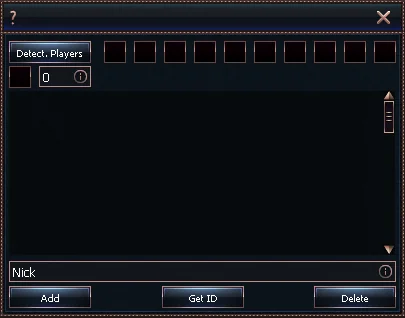
List of characters that should NOT be detected
Notification methods
- Sound
- Plays an alarm sound when another player is detected.
- You can change the sound by editing the player.wav file located in *\HLBot\data\sounds\
- The default sound alert sounds like this:
- Chat message
- Sends a chat message informing you about the detected player

- Sends a chat message informing you about the detected player
- Notification
- Displays a notification about another player’s presence in the bottom center of the screen

- Displays a notification about another player’s presence in the bottom center of the screen
- Logout
- Automatically logs out your character after detecting another player
- Close the game
- Immediately closes the game client after detecting another player
- Change channel
- Automatically switches your character to another server channel
- Lets you continue playing after avoiding another player
- Stop all functions
- Instantly stops all active bot functions (except detectors)
- Highlight game window
- Highlights the game window after detecting a player
- Useful to grab your attention if the game is running in the background
- Show game window
- Automatically restores the game window after detecting a player
- If the game is minimized, it will be restored
- Detect only when farmbot has a target
- The detector will only work when the farmbot is close to its target
- Useful to avoid detections while the bot is just running along a path
- Never resume
- The bot will not resume the function when it stops detecting a Player
- Resume delay
- The bot will resume the function after the set time has elapsed.
- 0 = immediately when it stops detecting a Player
- List of characters that should NOT be detected
- Lets you manually add character names that the bot should NOT detect
- Useful for farming in a group with your own accounts