Launcher
First run of the bot
Before downloading the package, disable your antivirus and browser file scanning.
The files do not contain a virus, but they are protected with encryption tools, which makes antiviruses falsely flag them as viruses.
- If you downloaded HLBot.exe (archive)
- If you downloaded Patcher.exe (patcher)
After downloading the HLBot.zip package, extract it anywhere on your computer.
Then run HLBot.exe and wait a moment until the required files are downloaded.
The launcher will change its name to a randomly generated one.
We recommend creating a separate folder for bot files to easily manage the installation and avoid conflicts with game files.
Now just select the language you want to use the bot in and log in with your details.

- Field to enter your HLBot.net login or email
- Field to enter your password
- Login button
- Button to choose launcher and in-game bot language
After downloading Patcher.exe, move it anywhere on your computer (preferably create a new folder).
Then run Patcher.exe, in the window that appears type Y and press ENTER.
The app will download all required bot files into the folder it is located in.
We recommend creating a separate folder for bot files to easily manage the installation and avoid conflicts with game files.
Now just select the language you want to use the bot in and log in with your details.
- Field to enter your HLBot.net login or email
- Field to enter your password
- Login button
- Button to choose launcher and in-game bot language
Launcher description
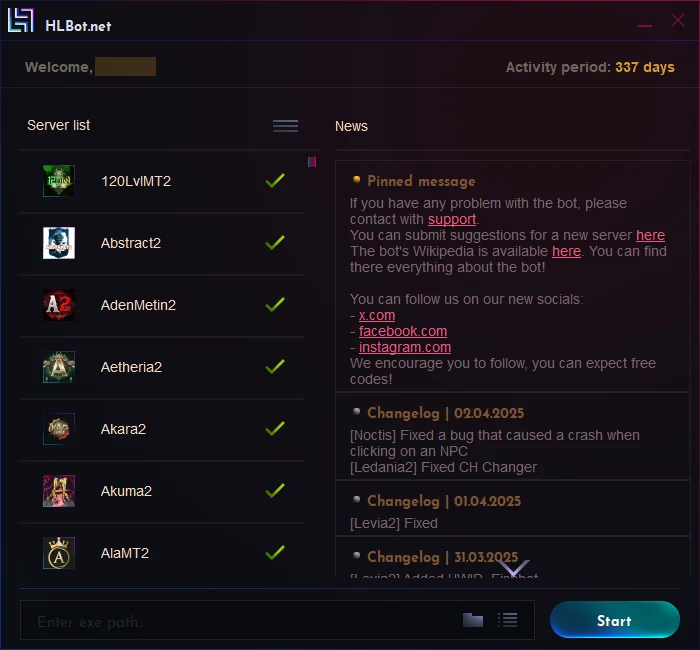
- Account login you are signed in with
- Remaining license time
- List of supported servers and their statuses
 | Means HLBot supports this server and updates are provided regularly if needed |
 | Means the bot doesn’t currently work there, but we’re working on restoring it |
 | Means the server may or may not work, and there won’t be further updates for it |
- Change server list sorting
- List of all news
- Path to Metin startup file
- Select the game client startup file
The file you select CANNOT be the server patcher!
- Injecting into an already running game client
Just double-click the Left Mouse Button on the selected process
Injecting the bot into the game
There are 2 methods to inject the bot into the game:
- Path method
- Process method
If the server only has a patcher, you need to use the second method
[VIDEO guide for injecting via path] Click to expand
To inject the bot via path you need to:
- Click the first icon on the left of the "start" button

- Select the location of the Metin startup file (it cannot be the patcher!)
- The client app may have different extensions like: .exe .bin .rac .uac .app
- After selecting the Metin startup file, click START and the game will launch with the bot
If it fails, try the second method
[VIDEO guide for injecting via process] Click to expand

To inject the bot via process you must:
- Manually (without the bot) run the game client (best to start via patcher)
- Click the icon next to the start button (shown above(1))
- From the list, select the Metin process you want
- Click Confirm or double-click Left Mouse Button

- List of game processes detected by the launcher
- Button to confirm process selection
If you have any issues with launching the bot, please contact support