Switchbot
Automatic mixing of bonuses in items
Warning
On better-protected servers, this feature may be detected by the logging system, which could lead to account suspension.
Tip
You can mix any item with bonuses.
The mixing speed cannot be changed, bonuses don’t skip, the system mixes at the maximum speed supported by the server.
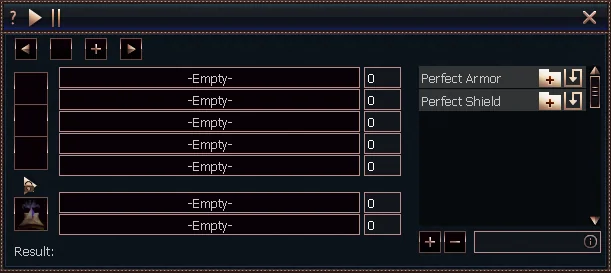
1
Enable mixing on all pages in switchbot
2
Disable mixing on all pages in switchbot
3
Slot for the item to mix
4
Slot for the item used to change bonuses
5
Pages with items to mix
(can be added infinitely)
(can be added infinitely)
6
List of saved bonus templates
7
Bonus selection
Switchbot functions
- Enable all pages in switchbot
- Starts mixing bonuses for all items added to switchbot
- Allows you to quickly start the process without enabling each page separately
- Disable all pages in switchbot
- Deactivates bonus mixing on all pages
- Lets you quickly stop the process without disabling each page separately
- Useful in emergency situations when mixing needs to be stopped immediately
- Slot for the item to mix
- Field where you need to place the item whose bonuses you want to change
- Supports all types of items with bonuses (weapons, armor, accessories)
- Slot for changing bonuses
- Area where you place items used to change bonuses
- The system will automatically use these items during the mixing process
- Pages with items to mix
- Allows you to configure multiple sets of items for mixing
- Lets you add more pages for different types of items
- New pages can be added infinitely
- List of saved bonus templates
- Displays previously saved sets of desired bonuses
- Allows for quick loading of frequently used configurations
- Saves time when re-mixing similar items
- Bonus selection
- Lets you precisely define which bonuses you want to obtain on an item
- Option to choose specific values for each bonus
- The bot will keep mixing until the chosen parameters are achieved