Keyboard Clicker
Automatic pressing of selected keyboard keys
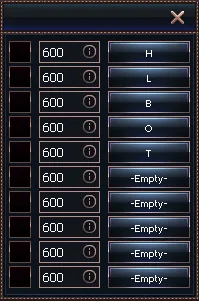
1
Enable automatic pressing of the selected key
2
Interval in seconds between each key press
3
Select the key to be automatically pressed
Auto Keys functions
- Enable automatic pressing of the selected key
- Activates or deactivates the automatic key pressing function
- When enabled, the bot will repeatedly press the selected key at the defined interval
- Interval in seconds between each key press
- Defines the time interval between each key press
- Value is given in seconds (fractional values allowed, e.g. 0.5)
- Smaller values mean more frequent pressing
- Select the key to be automatically pressed
- Click the "-Empty-" button, then press any key on your keyboard
- The chosen key will be registered as the one to be automatically pressed
- Supports all standard keyboard keys
- The selected key can be changed at any time