Inventory
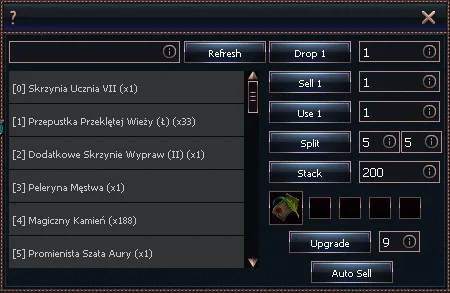
1
Inventory item search
2
How many items to drop (0 = all)
3
How many items to sell (0 = all)
4
How many items to open (0 = all)
5
Enter number of packs
6
Enter number of items per pack
7
Enter maximum stack size
8
Slot for item to upgrade (12)
9
Blacksmith
10
DT Blacksmith
11
Guild Blacksmith
12
Special item (8)
13
How many times to attempt upgrade
14
List of all inventory items
15
⚠️ This option is special and not available on all servers ⚠️
- Inventory item search
- Displays in the list (14) all items matching the entered text.
- How many items to drop
- The bot will drop the specified number of the selected item from the list.
- 0 = all
- How many items to sell
- The bot will sell the specified number of the selected item to an NPC.
- 0 = all
InfoA shop window must be open
- How many items to open
- The bot will open the specified number of the selected item from the list.
- 0 = all
- Enter number of packs
- Sets how many packs the bot will try to split the item into.
- Enter number of items per pack
- Sets the number of items in each pack.
- Enter maximum stack size
- Sets the number to which the bot will stack all items.
- Slot for item to upgrade (12)
- Lets you upgrade the selected item from the list using the chosen method.
- Blacksmith
- Uses the regular blacksmith function to attempt an upgrade.
- DT Blacksmith
- Uses the DT blacksmith function to attempt an upgrade.
- ⚠️If the server has the default blacksmith system, the item will be destroyed if the upgrade fails!
Warning!A "flag" is required to use the DT Blacksmith.
The flag is obtained after unlocking the Blacksmith.
The flag is one-time use and disappears after an upgrade attempt. - Guild Blacksmith
- Uses the guild blacksmith function to attempt an upgrade.
- Special item (8)
- Uses the specified item in slot 8 for the upgrade.
- The chosen item (if set by the server) will disappear after the upgrade attempt.
- How many times to attempt upgrade
- The bot will attempt to upgrade the item the specified number of times.
- List of all inventory items
- A list of items currently in the inventory
- [0] Symbolizes the slot where the item is located.
- AutoSell
- Opens the AutoSell function window