➕AutoSell
Automatic selling/deleting of items
danger
This is an additional ➕ feature, which means it is only available on some servers.
If the server has a function to sell/delete items directly from the inventory, you can request adding this feature on Support
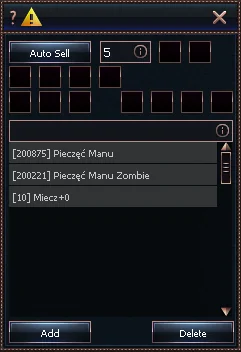
1
Information about which items will be sold/deleted with the current configuration
2
How often (in seconds) to attempt selling/deleting items
3
Sell items
4
Delete items
5
Inventory page 1
6
Inventory page 2
7
Inventory page 3
8
Inventory page 4
9
Sell items from the list
10
Ignore items from the list
11
Ignore items with bonuses
12
Sell weapons
13
Sell armors and jewelry
14
Sell Soul Stones
15
Sell others
16
Item list
- Information about which items will be sold/deleted with the current configuration
- Hovering the mouse over this icon will show a tooltip with details about which items will be sold/deleted and which will be ignored.
- How often (in seconds) to attempt selling/deleting items
- The bot will attempt to sell/delete selected items every specified time interval.
- Sell items
- When enabled, the bot will sell items according to the configuration.
- Delete items
- When enabled, the bot will delete items according to the configuration.
- Inventory page 1
- The bot will sell/delete items located on the first inventory page.
- Inventory page 2
- The bot will sell/delete items located on the second inventory page.
- Inventory page 3
- The bot will sell/delete items located on the third inventory page.
- Inventory page 4
- The bot will sell/delete items located on the fourth inventory page.
- Sell items from the list
- The bot will sell/delete items according to the settings plus those from the list (16).
- Example: The option "Sell weapons" is enabled, and the list contains "Monk Armor+0".
The bot will sell all weapons and also this armor.
- Ignore items from the list
- The bot will ignore items from the list when trying to sell/delete them.
- Example: The option "Sell weapons" is enabled, and the list contains "Sword+0".
The bot will sell ALL weapons except Sword+0.
- Ignore items with bonuses
- The bot will ignore items with bonuses when selling/deleting them.
- Sell weapons
- The bot will sell/delete all items of type "weapon".
- Examples of such items can be checked on this site by selecting the type "ITEM_WEAPON".
- ⚠️ Servers define item types themselves. Before enabling the function, it’s worth checking which items will be sold/deleted (1).
- Sell armors and jewelry
- The bot will sell/delete all items of type "Armor" and "Jewelry".
- Examples of such items can be checked on this site by selecting the type "ITEM_ARMOR".
- ⚠️ Servers define item types themselves. Before enabling the function, it’s worth checking which items will be sold/deleted (1).
- Sell Soul Stones
- The bot will sell/delete all items of type "Metin".
- Examples of such items can be checked on this site by selecting the type "ITEM_METIN".
- ⚠️ Servers define item types themselves. Before enabling the function, it’s worth checking which items will be sold/deleted (1).
- Sell others
- The bot will sell/delete all other items outside of the previous categories.
- Examples of such items can be checked on this site – these are all other items outside the previous categories.
- ⚠️ Servers define item types themselves. Before enabling the function, it’s worth checking which items will be sold/deleted (1).