Proxy
This function changes the IP within a given game client
Free proxy servers are low quality and may be used by many entities.
For Metin, very few are usable, so it’s worth getting paid, high-quality proxies.

- List of proxy files
- Displays available proxy list files located in the
hlbot/data/proxyfolder. - You can have many different lists, e.g. from various countries, of different quality, or for different accounts.
- Click on the chosen file to select it before loading.
- Displays available proxy list files located in the
- Load proxy
- Starts the process of loading and testing proxies from the selected file.
- The bot will automatically find working proxies from the list and connect.
- After a successful connection, a confirmation message will be displayed.
- If the process fails, you can try again or choose another file.
- Refresh file list
- Updates the list of displayed proxy files.
- Useful after adding a new file to the proxy folder without restarting the bot.
- Recommended after manually adding a new proxy list to the
hlbot/data/proxyfolder.
- HWID
WARNING!
- This option is special and only available on some servers.
- The list of servers where the HWID option is available can be found HERE – just check the filter

- To request adding this option on a server, you must create a Ticket. It’s important that the server actually requires this option – i.e., where the multifarmblock system is present!
- This option changes login data for a given account.
- The function was created to bypass the "multifarmblock" system, but it is also useful for bypassing a "hwid" ban.
How to use proxy?
To use the proxy function we need a proxy server list, which can be obtained from websites that offer free proxies or by purchasing a private list.
HLBOT only supports the following proxy types:
- SOCKS4 without authentication
- SOCKS5 without authentication
- SOCKS5 with authentication
Required proxy list formats
Different proxy types require different file formats:
SOCKS4 without authentication
The file entries must look like this:
ip:port
Example:
192.168.1.1:1080
45.67.89.10:4145
SOCKS5 without authentication
The file entries must look like this:
5:ip:port::
Example:
5:192.168.1.1:1080::
5:45.67.89.10:4145::
SOCKS5 with authentication
The file entries must look like this:
5:ip:port:login:password
Example:
5:192.168.1.1:1080:user:pass
5:45.67.89.10:4145:admin:12345
Step-by-step proxy usage guide:
- Download a proxy list from any site (for example we’ll use this site, but it’s recommended to find another on your own).
Choose:
- Protocol (socks4 or socks5)
- Country for the proxy list
- Maximum ping
- Click "Apply"
- When the list is filtered, click "Download" in the "ip:port" format and "txt"
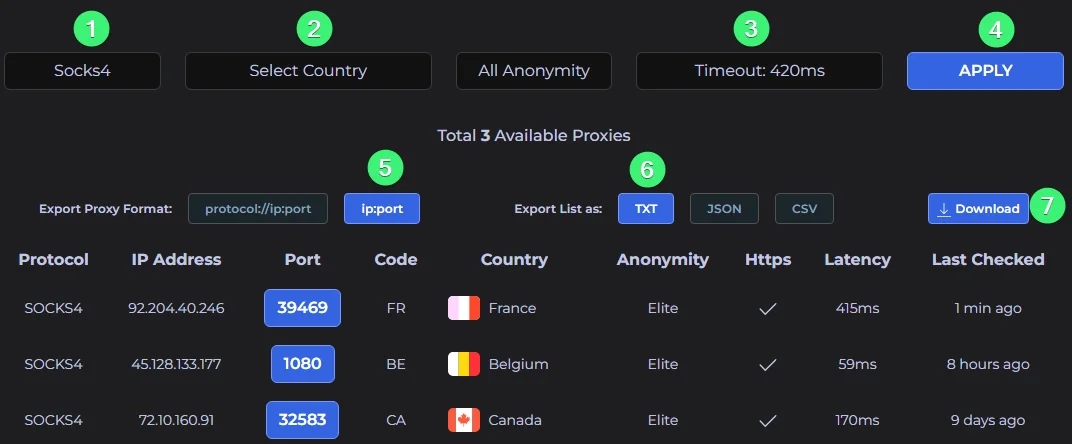
-
Place the downloaded file in the
hlbot/data/proxyfolder.- You can rename the downloaded file to something easier, it doesn’t matter.
-
⚠ Make sure the proxy server format in the file matches the required one for the given proxy type (as described above).
-
Start HLBot on any server and click the proxy option.
-
After selecting the file in the proxy function, click "Load proxy". A message will appear on screen:

- If this message appears:

It means you’re connected and can log in to the game.
If this message appears:

It means the bot could not connect to any proxy servers.
Check if the file format matches the required format.
In the logs you can see more detailed information about the connection attempt.
Example sites with free proxies
Free proxies are very low quality and the vast majority of them are not suitable for playing Metin.
Using free, public proxies carries a risk of bans, since other people may also be using the same proxies.